



Products Conversion Tracking

Real sales in.
Better ads out.

Meta and Google learn from the sales that actually happened, sent server-side from your Shopify orders with the customer's consent state on every event. Your budget goes after buyers, and you can trace each sale back to its click.

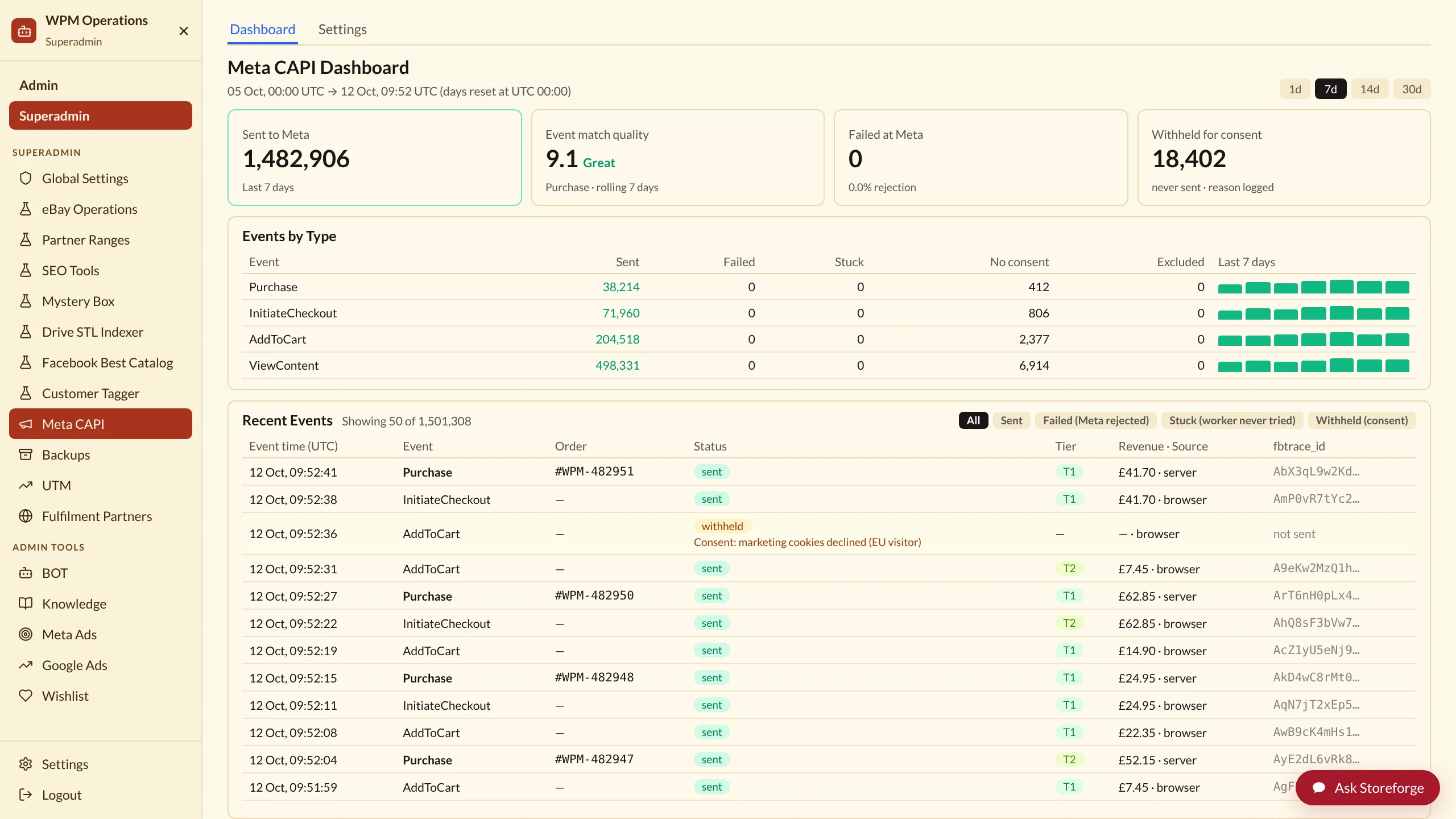
A clean event log on a laptop: Purchase, Checkout started and Add to cart rows, each marked sent to Meta and Google, with one marked withheld for consent and its reason shown.

Works with

ShopifyMetaGoogle AdsGA4

Saves money

Ad platforms optimise on real orders, with phantom and duplicate events kept out.

On autopilot

Every order is sent to Meta and Google within minutes, with no tags to maintain.

Less friction

One record of every event, and why any were held back.

In one look

The signal your ads learn from, built to stay right.

Feature · what it is

Meta Conversions API, Google enhanced conversions and GA4 events sent from your Shopify orders and checkouts, a browser pixel for the top of the funnel, first-party attribution of every order, and hourly checks on the whole pipeline.

Advantage · why it is better

Purchases and checkouts come from the order itself, never the browser, so ad blockers, theme changes and cart shortcuts cannot inflate or erase them. Browser and server copies share one event id, so Meta counts each action once.

Benefit · what you get

Meta and Google find more buyers for the same budget, and you can check what they report against sales you can trace.

Time back

Weeks of set-up, skipped.

Server-side tracking usually means a developer project. In Storeforge you connect your accounts and every order is sent from then on.

Typical developer time to set up server-side tracking

2 to 3 weeks

Cometly, 2026 (a vendor estimate). Then nothing to maintain.

Work out your own time back ›
Setting up server-side eventsWeeks, once

Often quoted as two to three weeks of a skilled developer's time.

Cometly, Conversion API set-up cost, April 2026

Keeping tags working after theme changesOngoing

Purchases come from your orders, not your theme, so there is nothing to re-tag.

How Storeforge sends events

What is inside

Six tools. One trustworthy signal.

Meta Conversions API

Feature

Purchase and checkout events sent server-side from Shopify, plus browser events for page views, product views and add to cart.

Advantage

Checkouts are only sent when Shopify records a real one, and known bots are screened out before anything is sent.

Benefit

Meta learns from complete, accurate sales and finds buyers faster.

Google enhanced conversions

Feature

Purchases uploaded to Google Ads from the server, matched on securely hashed email and phone.

Advantage

Conversions are counted even when a click ID is lost along the way, and subscription renewals can be uploaded as their own conversion.

Benefit

Smart bidding works from your real sales, including repeat revenue.

GA4 events

Feature

Purchase and checkout events sent to GA4 from the same order data, deduplicated by order.

Advantage

Analytics and ads agree, because they share one source.

Benefit

Reports you can trust in every meeting.

Consent and audit

Feature

Every event records the customer's consent state and whether it was sent, held or excluded, with the reason.

Advantage

One consent policy covers Meta and Google, reported to both truthfully. Switch on the consent gate to hold back conversions without marketing consent.

Benefit

Compliance you can show, set to your own policy.

First-party attribution

Feature

Storeforge records each visit's campaign tags and click IDs and ties each order it can to its source.

Advantage

You get an independent floor to set against what Meta and Google claim, with a daily band per campaign and ad.

Benefit

Budget decisions based on sales you can trace.

Pipeline checks

Feature

Named hourly checks on purchases, checkouts, page views and uploads, including flood checks against a 7-day median.

Advantage

A silent pixel or a burst of phantom events is caught within the hour.

Benefit

Your ads keep learning from clean data.

How it works

Set it up once. Then it runs.

  1. 1

    Connect your ad accounts

    Link your Meta pixel and Google Ads account to Storeforge.

  2. 2

    Orders start flowing

    Every Shopify order and checkout becomes a server-side event within minutes.

  3. 3

    Check it against Shopify

    The event log shows what was sent, what was held back and why, and each order's source.

What it is worth

Server-side tracking, without the per-order bill.

Dedicated tracking apps usually charge by the order, so the bill grows as you do. Storeforge sends every order on every plan.

Compare the whole toolset ›
Server-side trackingElevar Core (up to 2,000 orders, then $0.50 per order)$225/mo
In StoreforgeIncluded on every plan

Shopify App Store list price, checked 12 October 2026. Alternatives: Littledata Scale $199/mo.

Questions.

Do I still need the Meta pixel?

Yes, for page views and add to cart. Purchases and checkouts come from your orders on the server.

What about customers who decline tracking?

Their consent state is recorded on every event and passed to Meta and Google. Turn on the consent gate and their conversions are recorded but not uploaded.

Does it work with Google Ads and GA4 together?

Yes. Both are fed from the same order data.

How do I know it is still working?

Hourly checks watch each event type and alert you in plain words when one stops or floods.

Better together

Ad Studio and SocialMake the creative, then measure it on real sales.Learn more ›Email and OffersThe same customers, the same truth, across every channel.Learn more ›Cart and SearchTurn the traffic you paid for into bigger baskets.Learn more ›

Stop paying for clicks that never buy.

Conversion Tracking is included on every Storeforge plan, alongside every other product. Free to start.

Start freeBook a walkthrough ›